

In today’s digital age, parental controls on smartphones are more crucial than ever. With children having increased access to the internet and mobile applications, it’s essential for parents to understand how to implement and utilize these controls effectively. This article provides a comprehensive guide on how to enable parental controls on various smartphone operating systems, empowering you to create a safer online environment for your children. Learn how to manage screen time, restrict access to inappropriate content, control app downloads, and monitor your child’s smartphone activity.
Implementing parental controls on your child’s smartphone can provide significant benefits. By actively managing their digital experience, you can protect them from exposure to harmful content, cyberbullying, online predators, and excessive screen time. This guide will equip you with the knowledge and tools necessary to navigate the world of smartphone parental controls, ensuring your child’s online safety and well-being while allowing them to enjoy the positive aspects of technology. Whether you are concerned about specific apps, websites, or simply want to establish healthy digital habits, understanding smartphone parental controls is a vital step in responsible parenting in the digital age.
Why Use Parental Controls?
In today’s digital age, children have access to a vast amount of information and entertainment through smartphones. While this access can be beneficial, it also exposes them to potential risks such as inappropriate content, cyberbullying, and online predators.
Parental controls provide a safety net, allowing parents to manage and monitor their children’s smartphone usage. These controls empower parents to restrict access to certain apps, websites, and content, creating a safer online environment.
Furthermore, parental controls can help manage screen time, preventing excessive use that can interfere with sleep, schoolwork, and other important activities. They also provide a valuable tool for promoting healthy digital habits and responsible smartphone use.
Set Screen Time Limits
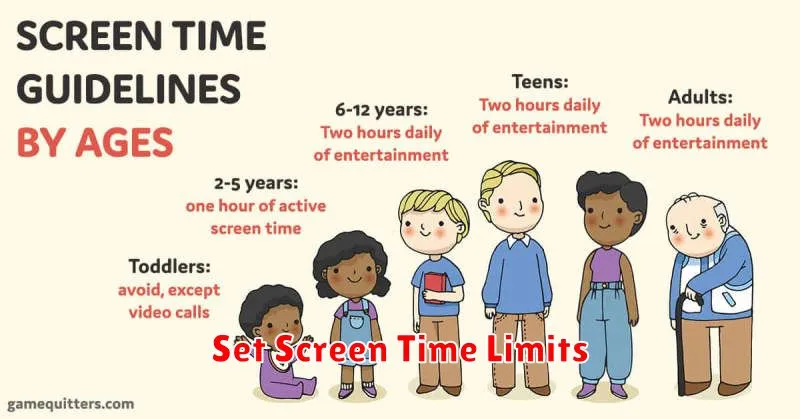
Setting screen time limits is a crucial aspect of parental control. It helps manage the amount of time children spend on their devices, promoting healthy digital habits and preventing excessive screen exposure. This feature allows you to define specific timeframes for device usage, restricting access outside the allotted periods.
Most smartphones offer built-in screen time management tools. These tools often allow for setting daily or weekly limits for overall device usage, or even for individual apps. For example, you might allow one hour of game playing per day, while allowing unlimited time for educational apps.
Some operating systems categorize apps into groups such as “Social Media,” “Games,” or “Entertainment,” making it easier to manage usage across similar app types. You can also schedule “downtime” periods where access to specific apps or the entire device is blocked. This is often utilized during bedtime or school hours.
Block Inappropriate Content
Blocking inappropriate content is a crucial aspect of parental controls. This typically involves filtering websites, apps, and other digital media based on age ratings, content categories, or specific keywords. Content filters can be configured to restrict access to material deemed unsuitable for children, such as violence, pornography, hate speech, and gambling.
Many smartphones offer built-in content filtering options within their settings. Third-party parental control apps provide more comprehensive filtering capabilities and allow for greater customization. These apps often include features like web filters, app blockers, and search engine monitoring.
When setting up content filters, consider your child’s age and maturity level. Start with stricter settings and gradually loosen restrictions as they grow older and demonstrate responsible digital behavior. Regularly reviewing and updating these settings is essential to ensure ongoing protection.
Restrict App Installations
Limiting app installations is a crucial aspect of parental control. This prevents children from accessing inappropriate or potentially harmful content. App stores offer built-in features to manage app downloads based on age ratings.
You can typically configure these settings within the app store itself. Look for options related to content restrictions or parental controls. These settings allow you to specify the maximum age rating for allowable apps. For example, setting the restriction to “Everyone 10+” prevents the installation of apps rated for older audiences.
Some devices also provide the ability to completely block app installations from sources other than the official app store. This further enhances security and control over the apps accessible to the child.
Monitor Usage and Reports
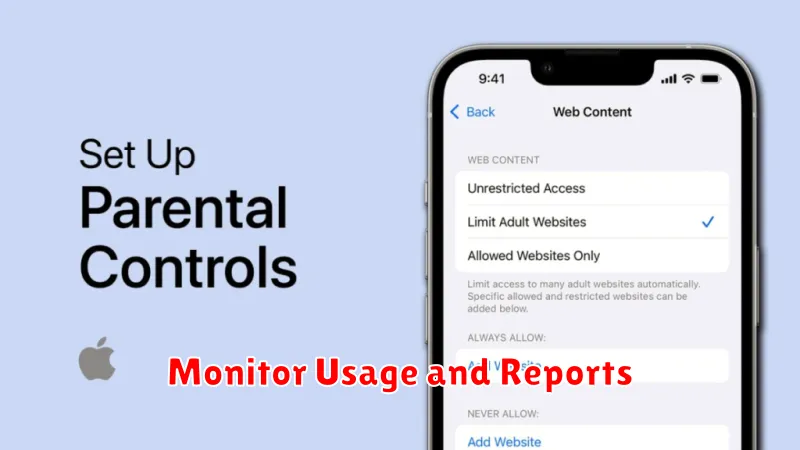
Most parental control systems offer monitoring and reporting features. These tools provide valuable insights into a child’s digital activities. Regularly reviewing usage reports can help parents understand how their children are using their devices and identify any potential risks.
Typical reports include app usage, web browsing history, and communication logs. Some systems also track location data. This information empowers parents to have informed conversations with their children about online safety and responsible digital habits.
Key data points often found in these reports:
- Time spent in specific apps or categories (e.g., games, social media).
- Websites visited, including the frequency and duration of visits.
- Contacts communicated with via messaging apps or phone calls.
- Location history (if enabled).
By understanding how these reports work and utilizing the information they provide, parents can effectively guide their children toward a safer and more balanced online experience.
